· VPX Team
How to run your own prediction market to bet with friends
Every friend group has a few running arguments. Whether it will snow on Christmas. Whether the ski trip actually happens. Whether Dad finally fixes the fence. Someone says "wanna bet?", a number gets tossed around, and by February nobody remembers what was agreed.
A private prediction market fixes that. Everyone gets the same pile of play money, you trade YES and NO shares on the question, and the price moves as people back their opinions. When the answer comes in, the host settles the market and the standings show who called it.
This guide runs through the whole thing on the Vancouver Prediction Exchange (VPX). We built a real market for the screenshots, "Will it snow in Vancouver on Christmas Day?", with Maya hosting and her friends Bob and Carol joining in. Follow along with your own question as you read.
In this guide
The basics in 30 seconds
Everything here uses play money. Nobody deposits and nobody cashes out. You are playing for the top of the standings and the bragging rights that come with it.
Four ideas cover how it works:
- Shares. Every question has YES and NO shares. When the market settles, each share on the winning side pays $1.00 and each losing share pays nothing.
- Prices. Shares trade in cents, from 1¢ to 99¢. A YES price of 40¢ means the group thinks there is roughly a 40% chance the answer is yes. Buy YES at 40¢ and you make 60¢ a share if you are right, or lose the 40¢ if you are wrong.
- Play money. Everyone who joins gets the same starting balance, and it only exists inside this one market. Your balance in a friend's market has nothing to do with the public VPX markets or any other private market.
- Settling. When the answer is known, the host picks the outcome and VPX pays everyone out. The standings show who finished up and who finished down.
To follow along you need three things: a free VPX account, a yes or no question with a clear answer and a date you will know it by, and a couple of friends. Two is enough to start trading.
Step 1: Create your market
Sign in and open the VPX home page. The Private Markets section near the top has a plus button on the right. Your market shows up here once it exists.
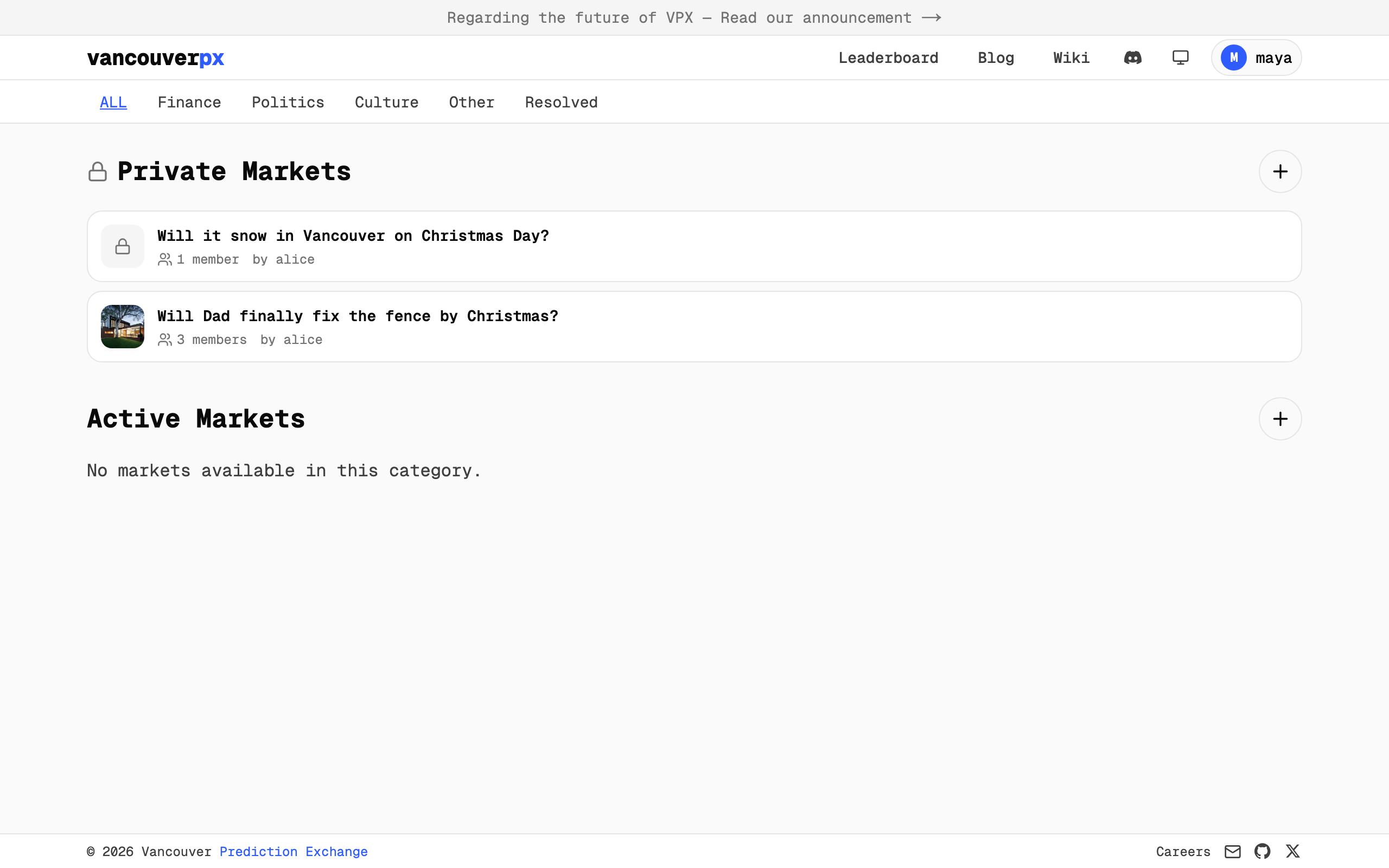
The plus button opens the create form. Here is what we filled in, and what each field does.
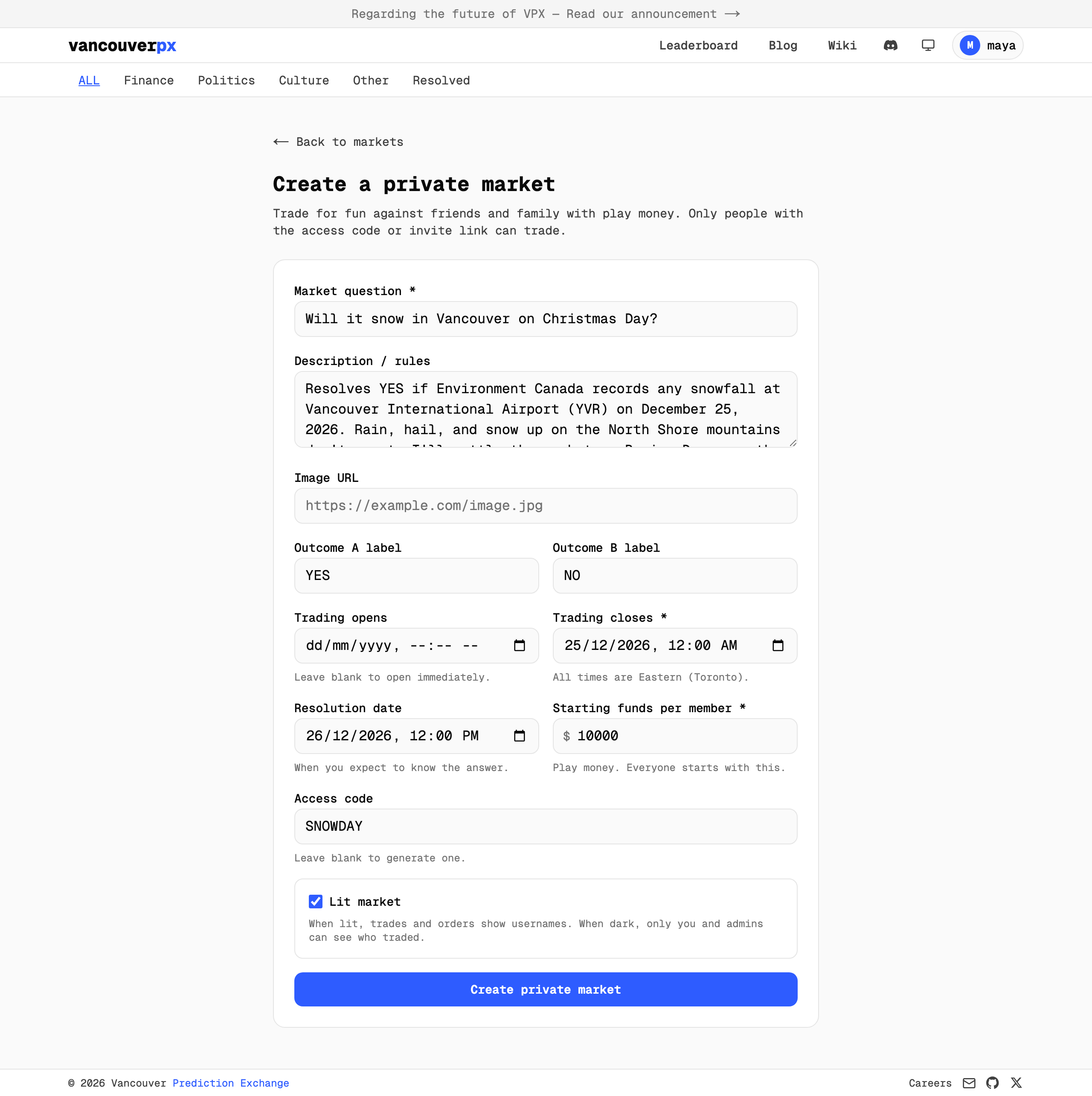
- Market question. One sentence with a yes or no answer. "Will it snow in Vancouver on Christmas Day?" works. "How much will it snow?" does not, because there is no single answer to pay out on.
- Description / rules. The most important box, and the one people skip. Write down exactly how you will decide, including the source and the edge cases. Ours resolves YES if Environment Canada records any snowfall at YVR on December 25, with rain and the North Shore mountains left out. Spelling this out now saves a group chat argument in December.
- Image URL. Optional. Adds a picture to the market card.
- Outcome labels. These default to YES and NO. Rename them to something like "Snow" and "No snow" if that reads better.
- Trading opens and closes. Leave "opens" blank to start right away. The close time is when trading stops, so nobody can bet once the answer is obvious. The form uses Eastern time, so adjust if you are out west.
- Resolution date. When you expect to know the answer. Members see it so they know when to expect a payout.
- Starting funds per member. The play money everyone gets. We left it at $10,000. Bigger numbers only change how the totals look.
- Access code. A short word friends type to join. We used SNOWDAY. Leave it blank and VPX makes one for you.
- Lit market. Leave it checked so everyone sees who traded with whom, which is usually the fun part. Untick it for a dark market where trades show without names. Standings are named either way.
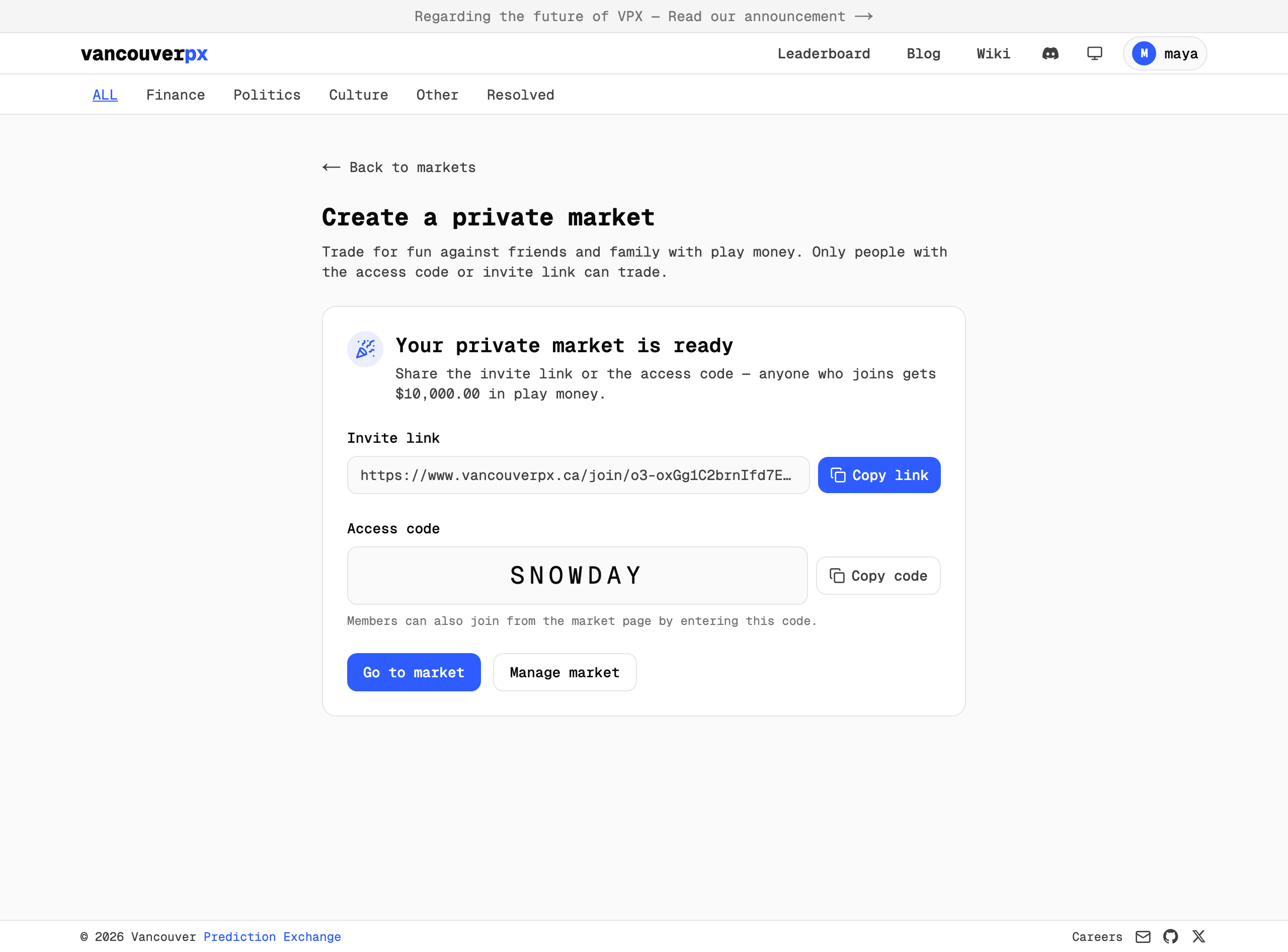
Click Create private market and you land on a confirmation page with the two things you need to invite people, the invite link and the access code.
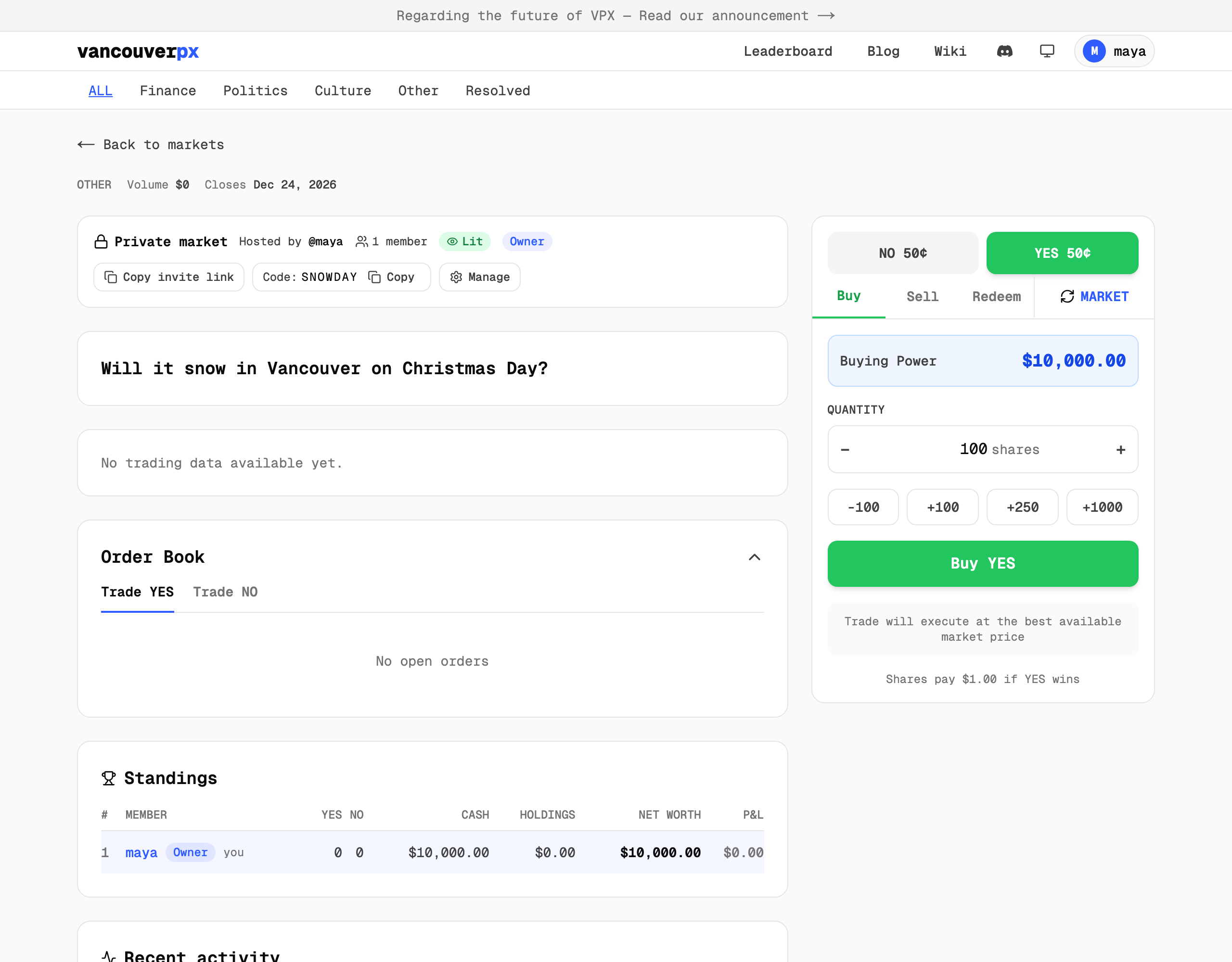
Click Go to market to see it live. As the host, Maya sees a private market banner with the invite link, the code and a Manage button, then the question, an empty order book, and the standings with just her in them.
Step 2: Invite your friends
There are three ways in, and you can use all of them at once.
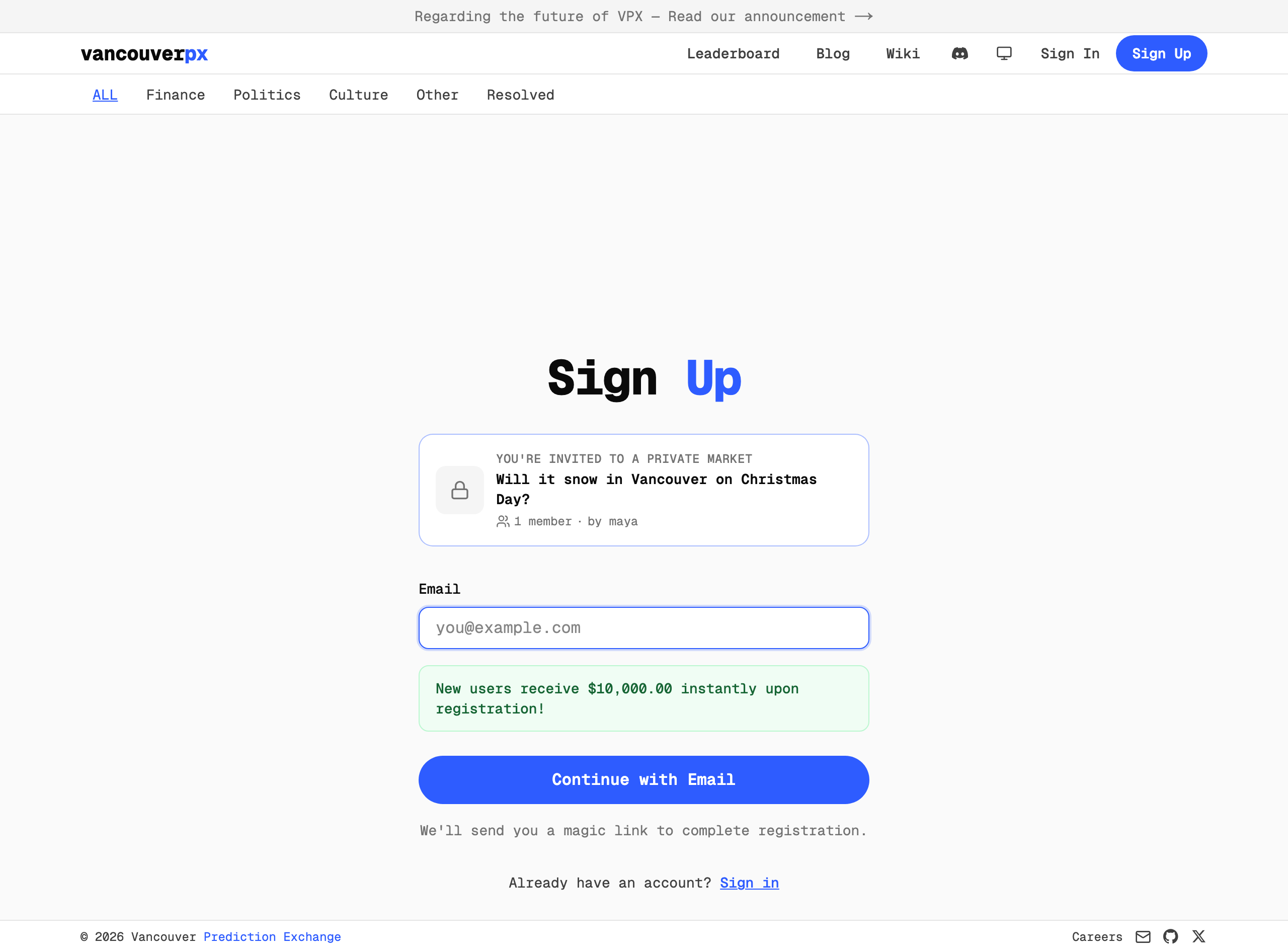
The invite link is the easiest. Copy it into the group chat. A friend without an account sees a sign up page with your market at the top, and becomes a member the moment they finish signing up. A friend who is already signed in gets added and taken straight to the market.
The access code is for friends who already use VPX. Anyone who opens the market page without being a member sees a box asking for the code. Bob went this route. He typed SNOWDAY and pressed Join market.
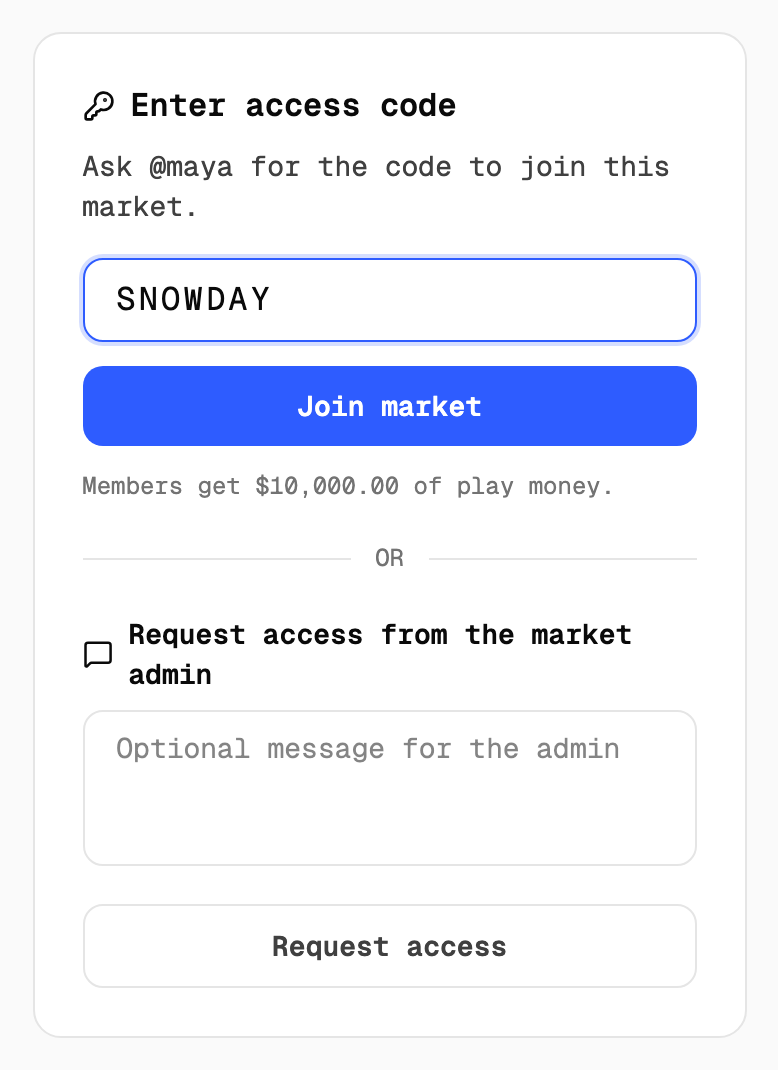
Requesting access is the fallback, sitting under the code box. Someone who finds your market but has no code can send you a short message, which shows up on your Manage page to approve or decline.
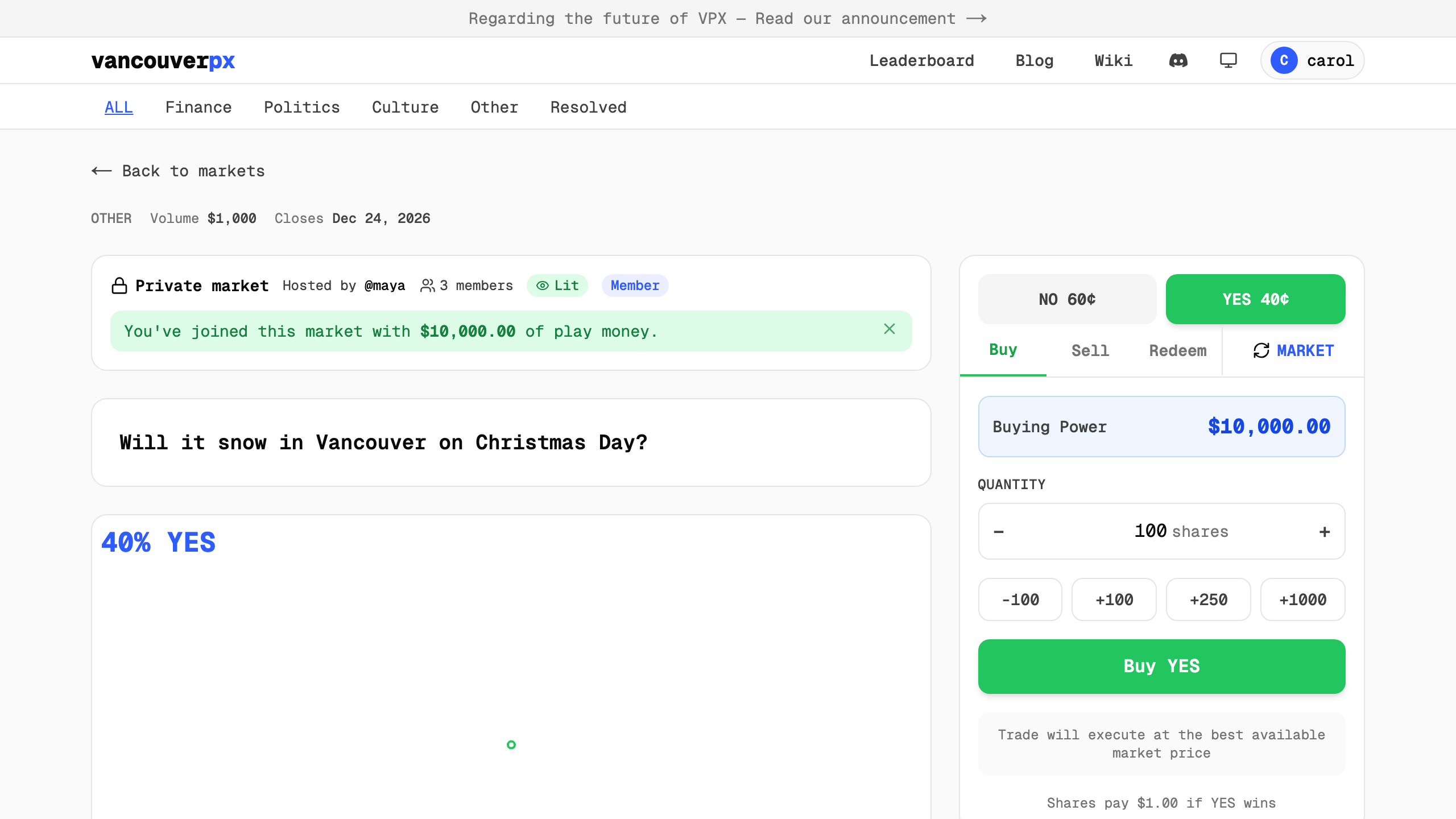
However they arrive, new members see a confirmation that they have joined with their play money. Here is Carol, who came in through the invite link.
Step 3: Place a bet

The trade panel sits on the right of the market page, or below the chart on a phone. Pick a side at the top, YES or NO. Underneath are the Buy, Sell and Redeem tabs, and a toggle between MARKET and LIMIT orders.
A market order takes whatever price is on offer right now. A brand new market has no offers yet, so the first few trades have to be limit orders. A limit order says "I will buy this many shares at this price or better." Switch the toggle to LIMIT, set your price in cents and your quantity in shares.
Maya thinks snow is likelier than her friends expect, so she buys 1,000 YES at 40¢. The panel does the math as she types. 1,000 shares at 40¢ is $400, and if it snows those shares pay $1,000 back, a $600 profit. The line at the bottom, "Shares pay $1.00 if YES wins", is the whole game in one sentence.
She clicks Buy YES. Nothing fills yet, because nobody has taken the other side, so her order rests on the book and waits.
Someone takes the other side
Bob is a skeptic. In his experience Vancouver gets rain at Christmas and the snow stays up on the mountains. He picks NO and buys 1,000 NO at 60¢.
Here is the neat part. Maya offered 40¢ for YES, Bob offered 60¢ for NO, and 40 plus 60 is 100. Between them they have put up exactly $1.00 per share, which is what one YES share and one NO share are worth together. So VPX pairs the two orders, takes $400 from Maya and $600 from Bob, and hands Maya 1,000 YES shares and Bob 1,000 NO shares. VPX calls this a marriage, and it shows up in the Recent activity feed.

Whatever happens on Christmas Day, one of them ends up with $1,000 and the other with nothing. The price settles at 40% YES, the last price the two of them agreed on. The marriage and divorce wiki page has the longer version, including what happens when a pair of shares gets split back apart.
Reading the order book
Carol joins next and figures snow is a little likelier than 40%. She bids 500 YES at 45¢. Maya hedges and bids 500 NO at 50¢. Neither order has a match yet, so both rest on the book.
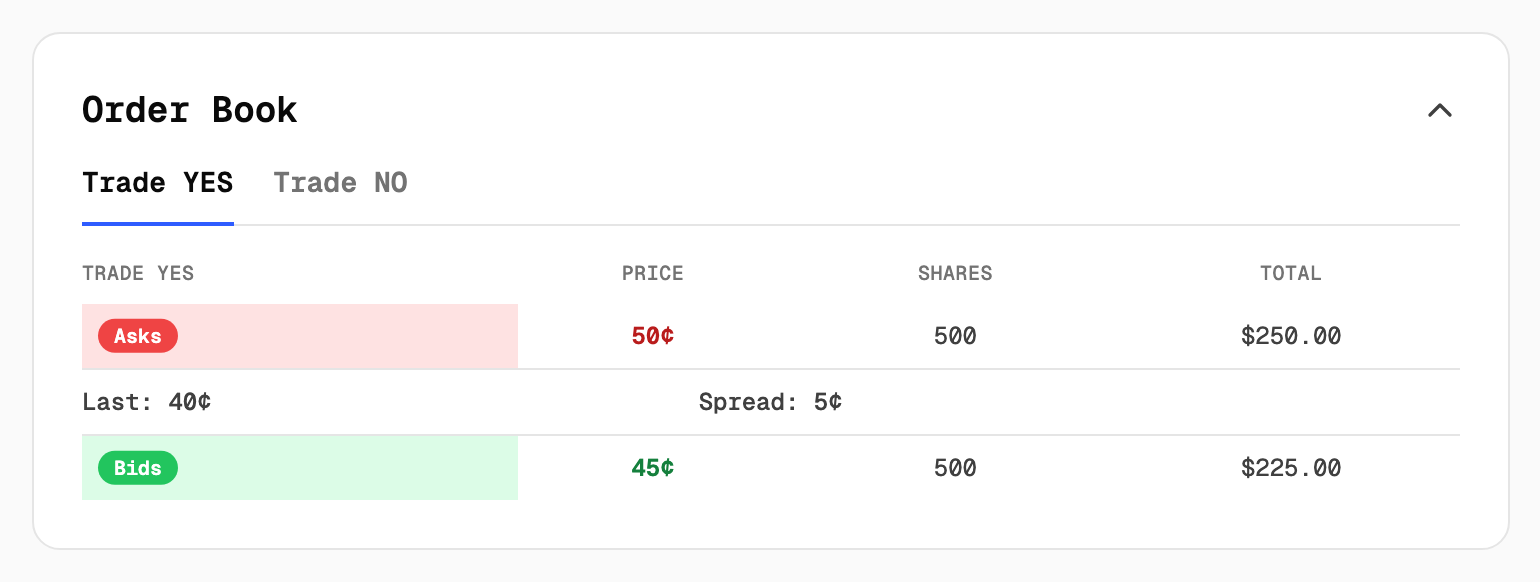
The order book lists everything people are currently willing to do. On the Trade YES tab:
- Bids are offers to buy YES. Carol's 45¢ bid sits here, 500 shares for $225.
- Asks are offers to sell YES. Maya's NO bid shows up here as an ask at 50¢, because someone willing to pay 50¢ for NO is, from your seat, willing to let you have YES for 50¢. The two of you would be putting up the full dollar together.
- Spread is the gap between the best bid and the best ask, 5¢ here. Last is the price of the most recent trade.
You never have to read the book to trade. The buttons at the top of the panel always show the current price for each side. It just helps to know what you are looking at.
Keeping score
The Standings card under the order book is your market's leaderboard.
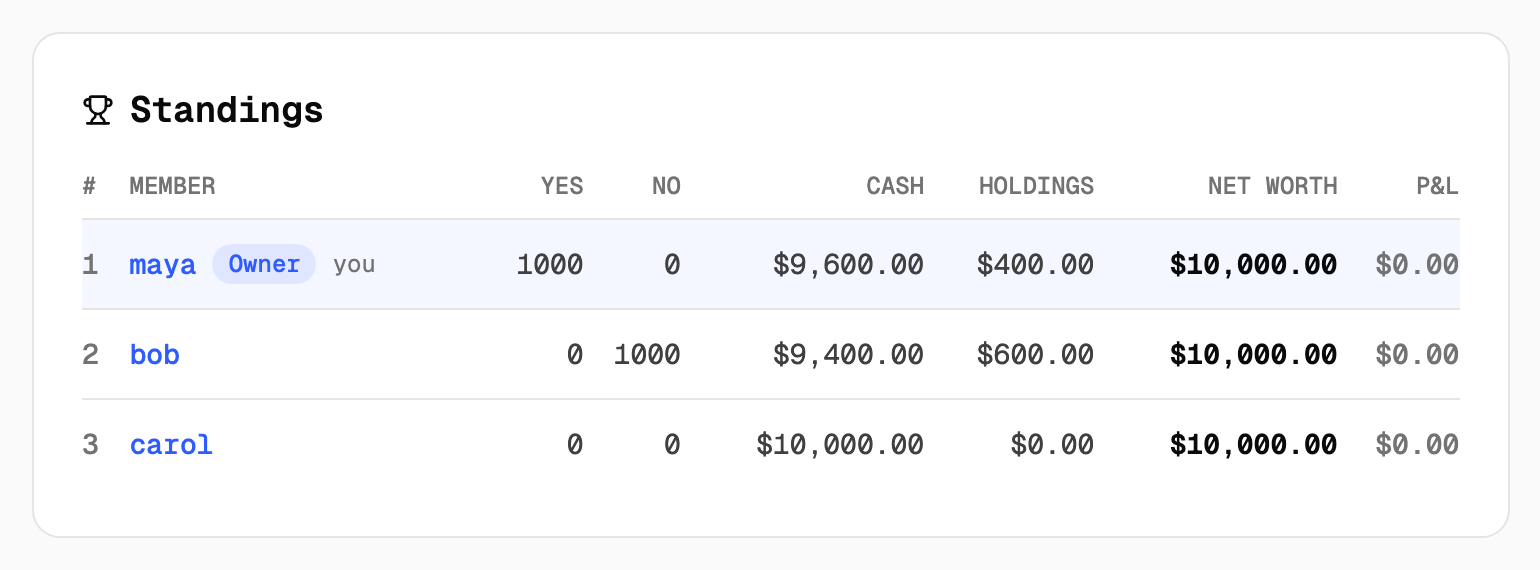
- Cash is play money not tied up in shares.
- Holdings is what your shares are worth at the current price.
- Net worth is the two together, and P&L is how far that sits above or below your starting funds.
Everyone is at $10,000 for now, because nothing has been decided and shares are marked at the price they were bought for.
Bob then buys 500 more NO at 55¢, which marries Carol's 45¢ YES bid. Maya now holds 1,000 YES, Carol holds 500 YES, and Bob holds 1,500 NO. You can also sell from the Sell tab, and if you ever hold a matching YES and NO share the Redeem tab turns the pair back into $1.00. Most friendly markets never need either. Back the side you believe in and wait for the answer.
Step 4: Manage the market
As the host you get a Manage button in the market banner. The Overview tab has your invite link and access code, a button to regenerate the link if it leaks somewhere it shouldn't, a box to change the code, and any pending access requests.
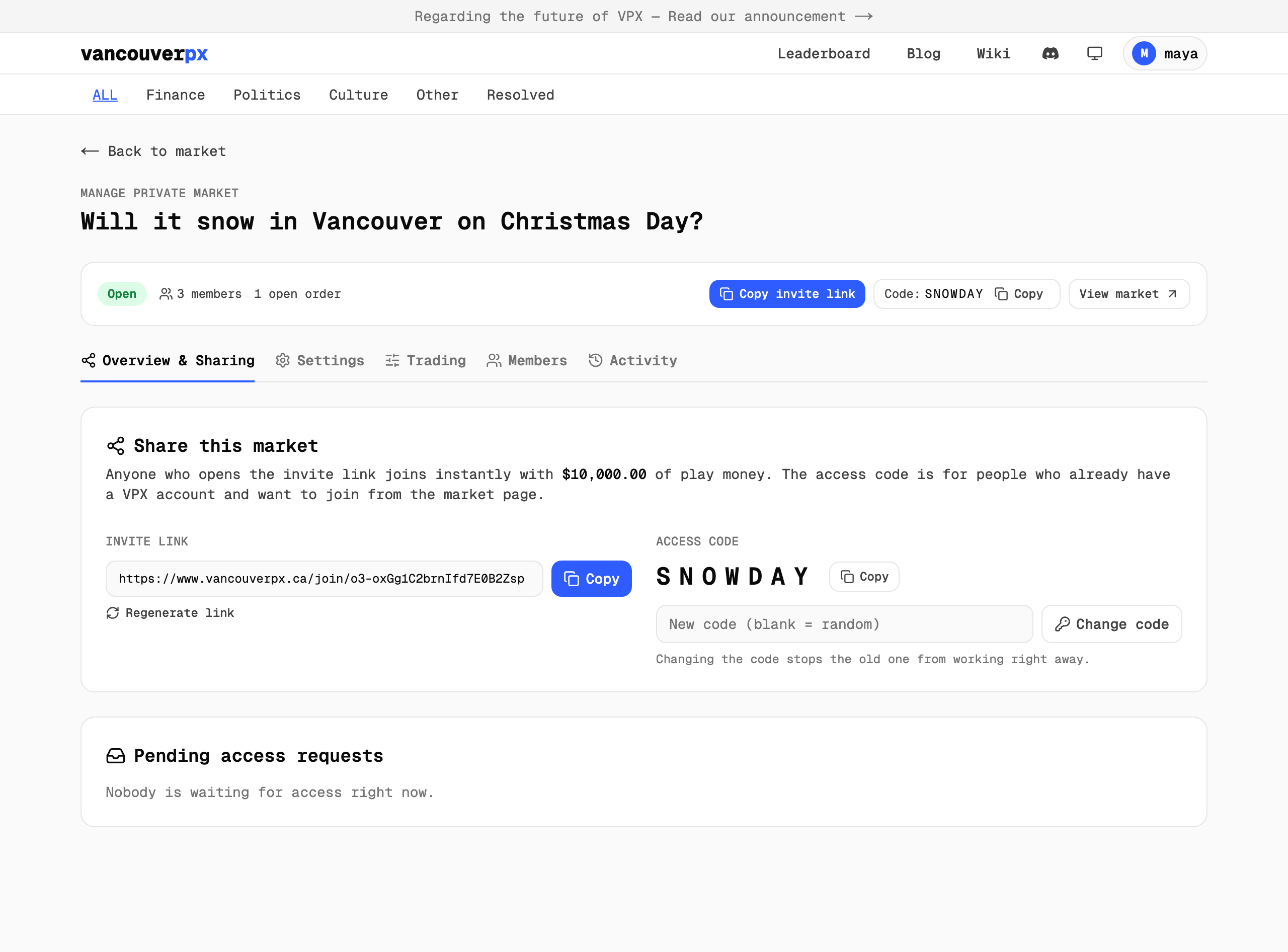
The other tabs:
- Settings edits the question, rules, labels, dates and starting funds after the fact, and switches between lit and dark.
- Members lists everyone in the market. Make someone an admin to help run it, remove a member, or top up their play money if they blew through it early.
- Activity is the full trade log.
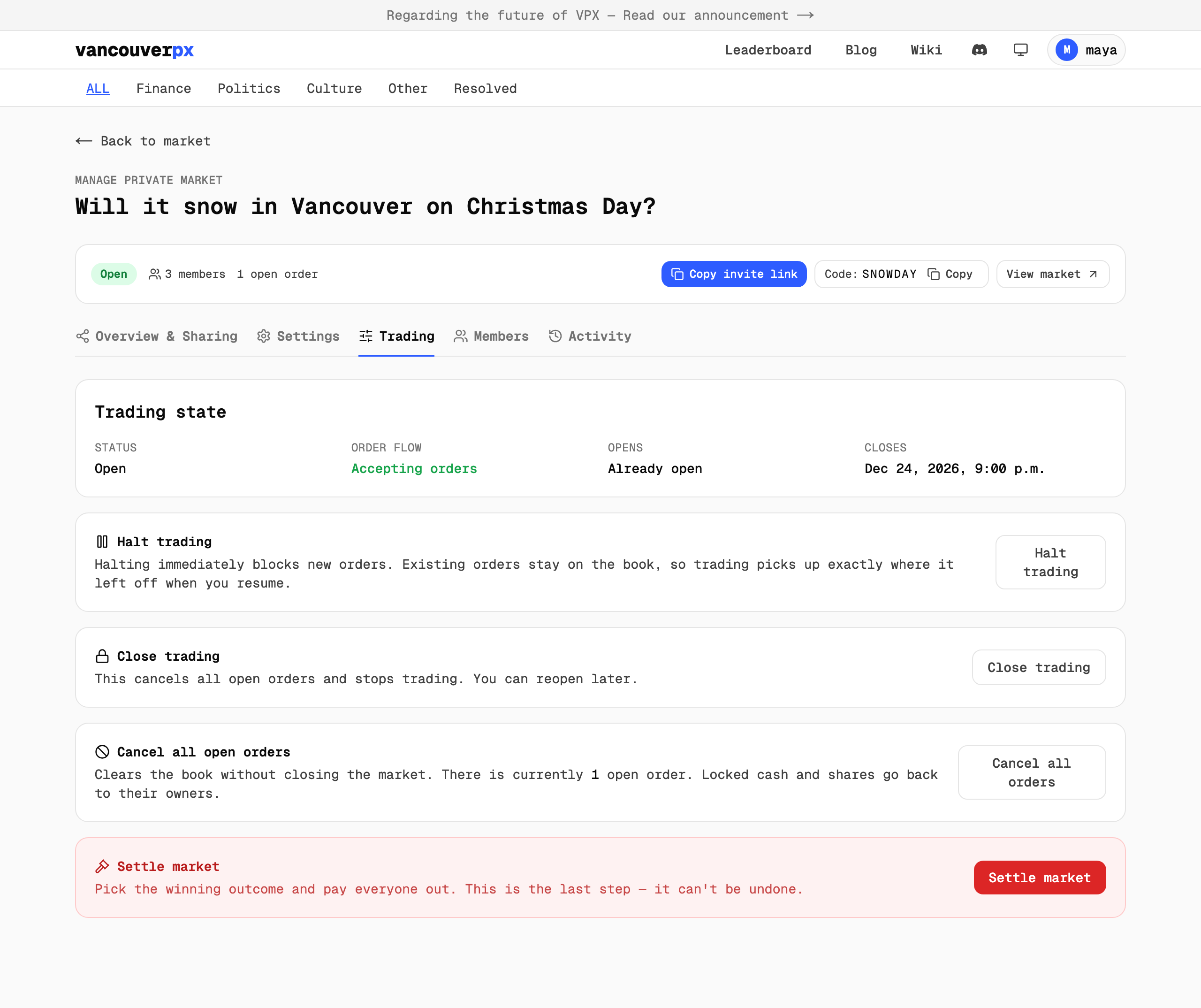
- Trading is where you pause and settle.
The Trading tab has three controls besides settling. Halt trading blocks new orders while leaving existing ones on the book, handy if you need to sort out a rules dispute. Close trading cancels every open order and stops trading, and you can reopen later. Cancel all open orders clears the book without closing anything.
Step 5: Settle and crown a winner
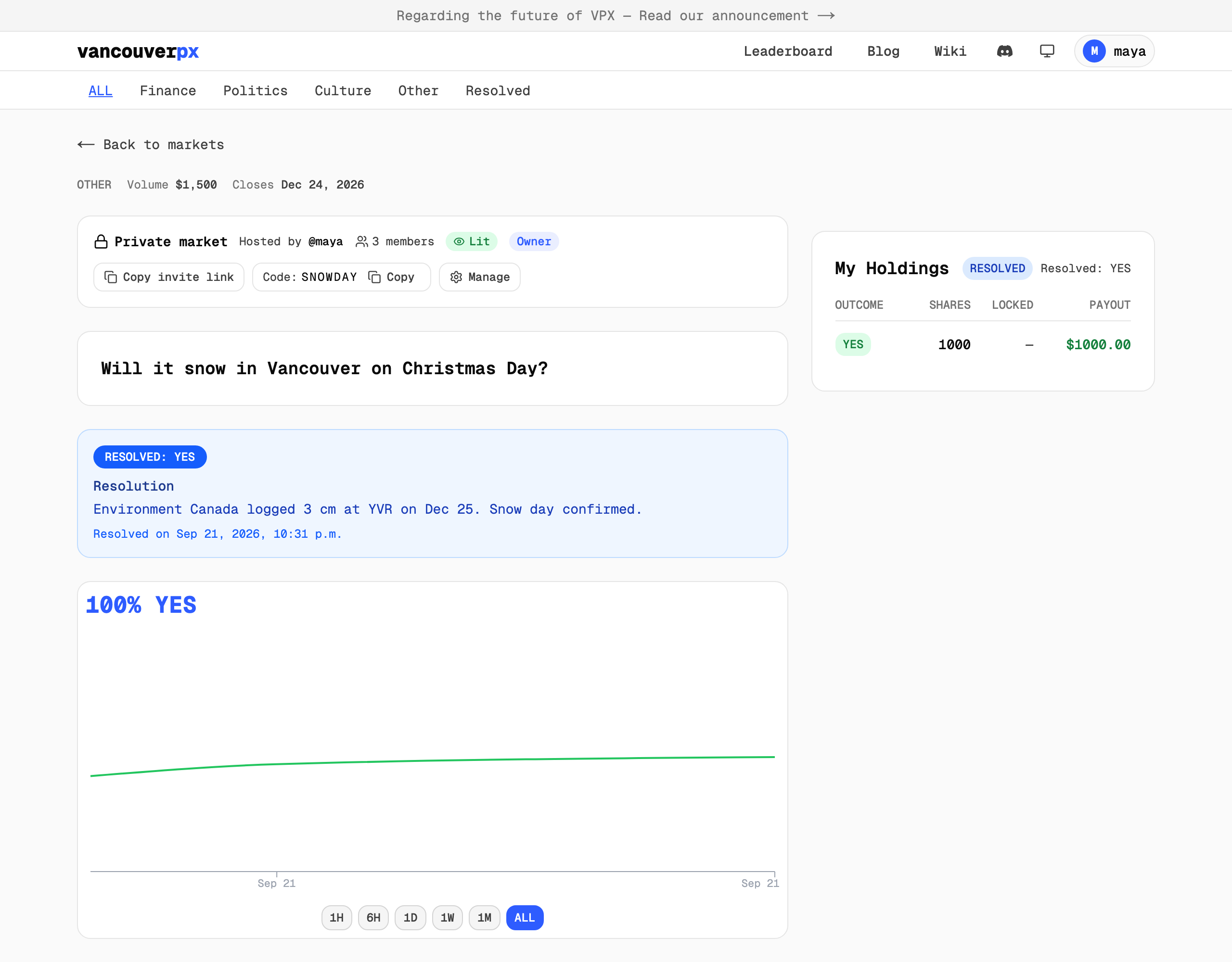
Christmas morning arrives and, in our story at least, it snows. Once you know the answer, open the Trading tab and click Settle market. Pick the outcome that actually happened, add a short note on how you decided, and confirm. You do not have to wait for the close date if the answer comes early.

Two things before you press the red button. Settling cannot be undone, so double check the outcome. And any orders still resting on the book are cancelled, with the play money returned to whoever placed them, so nobody is stuck with an order that never filled. Maya's 50¢ NO bid was returned this way.
The market page now shows the result and your note.
And the standings show the final score.
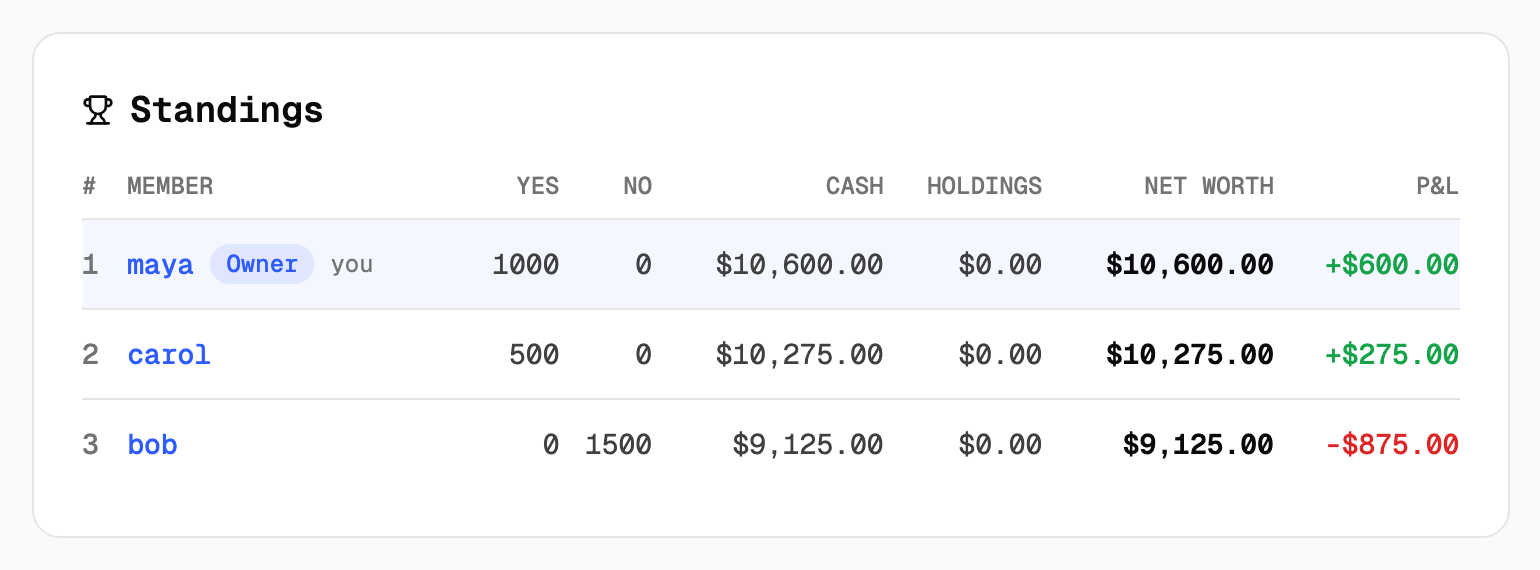
Here is where the money went:
- Maya paid $400 for 1,000 YES shares. Each one paid out $1.00, so she took $1,000 back and finished up $600.
- Carol paid $225 for 500 YES shares at 45¢. They paid out $500, so she finished up $275.
- Bob paid $600 for his first 1,000 NO shares and $275 for the next 500. NO shares paid nothing, so he finished down $875.
The winners' gains add up to exactly Bob's loss. Play money only ever moves between members. The market never creates or destroys any of it.
Good questions to bet on
The best questions are the ones your group already argues about. A few that work well:
- Will it snow on Christmas Day? Weather is a great starter because the source of truth is obvious.
- Will the group trip actually happen this season?
- Will Dad fix the fence by Christmas?
- Will the office get the new espresso machine before year end?
- Will the friend who "isn't seeing anyone" bring a date to the wedding?
Whatever you pick, write the rules as if the most argumentative person in the chat is going to read them. Name your source, cover the edge cases, and give a date.
Common questions
Is this real money? No. Private markets on VPX use play money only. Nothing is deposited and nothing is paid out in dollars.
How many people can join? As many as you send the link or code to. We used three here so the screenshots stay readable, and thirty works the same.
What if someone joins late? They get the same starting funds as everyone else. Prices may have moved by then, which is part of the fun.
Can I settle before the close date? Yes. If the answer becomes known early, settle whenever you are ready.
Can members see what I bet? In a lit market, yes, the activity feed shows names. In a dark market, trades show up without names, though admins still see everything and the standings are always named.
What if the question can't be answered? Write that case into your rules up front, for example "resolves NO if the trip is postponed to next year." If something truly unforeseen happens, halt trading from the Manage page and talk it over with your members before you settle.
That is the whole loop: create, invite, trade, settle. The first market takes about ten minutes to set up, and the second one takes two. To go deeper on how prices and orders work, the order book wiki page is a good next read.